15% Off Selected iFixit Tools<\/a> \u2014 Limited Time<br\/>\nFree Shipping on Domestic Orders $75+<\/p>","createdAt":"2026-06-15T16:37:24.835Z","updatedAt":"2026-06-16T07:34:16.264Z","publishedAt":"2026-06-16T07:34:16.302Z","locale":"en","documentId":"s1gcjvoe15hdc1os0ndw1ggb"}}">

15% Off Selected iFixit Tools — Limited Time
Free Shipping on Domestic Orders $75+

RAM"},"subscribed":false,"isFavorite":false,"favoriteCount":0,"isCompleted":false,"completedCount":14,"shopifyStore":{"country":"US","currencyCode":"USD","language":"EN","storeCode":"us","shopDomain":"ifixit-us.myshopify.com","storefrontAccessToken":"db3099692534a56ecec7b974a329d302"},"guideData":{"title":"MECHREVO Z2 Laptop RAM Replacement","mainImage":"https:\/\/guide-images.cdn.ifixit.com\/igi\/jTWE4cZoWVly3hEK.140x105","mainImageUrl2x":"https:\/\/guide-images.cdn.ifixit.com\/igi\/jTWE4cZoWVly3hEK.200x150","mainImageUrlFull":"https:\/\/guide-images.cdn.ifixit.com\/igi\/jTWE4cZoWVly3hEK.large","published_date":"Dec 23, 2021","modified_date":"Apr 29, 2025","isTeardown":false,"guideCommentCount":2,"stepCommentCount":0,"viewCounts":{"today":9,"week":59,"month":332,"all":12719},"author":{"url":"https:\/\/www.ifixit.com\/User\/4028711\/Songxun+Cai","name":"Songxun Cai","image":"https:\/\/guide-images.cdn.ifixit.com\/igi\/lG6UQhQDvmWStFG4.thumbnail","authorCount":2,"historyUrl":"\/Guide\/history\/145609"},"difficulty":2,"difficultyName":"Easy","timeRequired":"15 minutes","flags":[],"mainImageWidth":"140","mainImageHeight":"105","totalTimeIso":"PT900S","stepCount":5}}">

MECHREVO Z2 Laptop RAM Replacement

What you need

  1. MECHREVO Z2 Laptop RAM Replacement, RAM: step 1, image 1 of 2 MECHREVO Z2 Laptop RAM Replacement, RAM: step 1, image 2 of 2
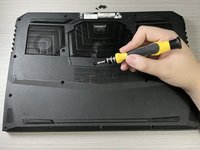
    • Using a Phillips screwdriver, remove eighteen 1.2mm Phillips #1 screws on the back.

    Ask FixBot

    Add Comment

  2. MECHREVO Z2 Laptop RAM Replacement: step 2, image 1 of 2 MECHREVO Z2 Laptop RAM Replacement: step 2, image 2 of 2
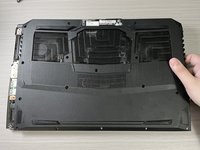
    • Remove the back plane.

    • Locate the memory slot.

    Ask FixBot

    Add Comment

  3. MECHREVO Z2 Laptop RAM Replacement: step 3, image 1 of 2 MECHREVO Z2 Laptop RAM Replacement: step 3, image 2 of 2
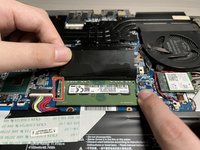
    • Open the retaining latches on either side of the RAM card with your fingers or plastic tool.

    • When both anchor pins are open, the RAM pops up.

    • Remove the RAM.

    Ask FixBot

    Add Comment

  4. MECHREVO Z2 Laptop RAM Replacement: step 4, image 1 of 3 MECHREVO Z2 Laptop RAM Replacement: step 4, image 2 of 3 MECHREVO Z2 Laptop RAM Replacement: step 4, image 3 of 3
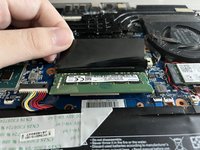
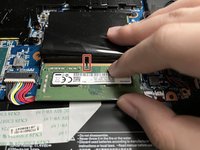
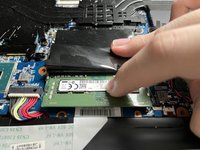
    • Align the notched part of the RAM with the raised part of the card slot.

    • Push inward until the notch and bulge coincide.

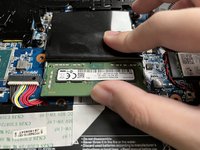
    • Press the other end of RAM down with your finger.

    • When you hear a clicking sound indicating that the retaining clips are reengaged, you are done installing.

    Ask FixBot

    Add Comment

  5. MECHREVO Z2 Laptop RAM Replacement: step 5, image 1 of 2 MECHREVO Z2 Laptop RAM Replacement: step 5, image 2 of 2
    • Assemble the back plate.

    Ask FixBot

    Add Comment

Conclusion

要放大说明您的设备,请进行这些操作。

Cancel: I did not complete this guide.

14 other people completed this guide.

Songxun Cai

Member since: 09/19/21

534 Reputation

1 Guide authored

Team

2 Guide Comments

Where can I find support for my mechrevo z2-g series gk5cp6z?

J. Sowell - Reply Share

Add Comment

View Statistics:

Past 24 Hours: 9

Past 7 Days: 59

Past 30 Days: 332

All Time: 12,719