Introduction
GUIDE SPEFIFIC NOTES:
- Note on Soldered Batteries: If your battery is soldered directly to the motherboard (as seen on some Toshiba models), this method is not applicable to your machine. You will need to desolder the old battery and solder a new one directly to the board, and the tab position is critical.
- SOCKET VS LEADED: This guide also only applies to laptops which use a pigtail cell, not ones with a socket on the board.
- Game consoles - bonus scope: The steps in this guide will work on PS2 Slim (except the SCPH-9XXX series) and PS3 models that use pigtail batteries. If yours is one of these, then this guide can be used to rebuild a dead battery. This does not apply to PS2 Fat models (socketed). Fat PS3s are mixed; check and see.
If your laptop's CMOS battery is dead and the OEM no longer sells new ones (and aftermarket ones are hard to find), you can take the dead battery apart and replace the bare cell so your laptop can hold the CMOS contents again.
IMPORTANT: Using tabbed cells is safer than soldering a bare battery, but the cell can still explode if the soldering iron is held to the tab too long. Only use this method if a pre-assembled replacement is unavailable or the pre-assembled battery is not cost effective.
Guide notes:
- The cell doesn't need 100% coverage, but the bare metal must be sealed and protected. Use heatshrink, but test the cell first—heatshrink is harder to remove than liquid electrical tape if you need to redo a connection.
- Laptop disassembly isn't covered here. Check iFixit or the manufacturer’s site for a teardown of your specific model.
- Sourcing: These are specialized parts usually only found online or in some video game shops.
- If your laptop uses a CR2016 or CR16 cell, you can substitute a CR2025 or CR2032 if there is enough physical room. Use vertical tabbed cells when possible when doing this.
- Do not bend tabs to fit, as this can cause a short. If you must use horizontal tabs, you need 19.2-19.3mm heatshrink to ensure the edges are safe.
- Example of the "correct" cell.
- Example of a cell with horizontal tabs which needs 19.2-19.3mm heatshrink.
What you need
-
-
Reliable name brand like Klein Tools, Southwire, Extech or Brymen (Greenlee in the US, or the BM235 from EEVblog in the US on Amazon - EEVblog also sells the BM786 and BM2257 but these ship from Australia)
-
Safe meter designed with proper fusing and a honest Cat rating
-
Optional — Ideally True RMS (sometimes known as TRMS) — easily met by 95% of CatIII meters at the $50+ range.
 Ask FixBot
-
-
Tool used on this step:Digital Caliper$39.95
-
Measure the cell outside of the laptop with a digital caliper and determine the size -- IGNORE THE LAST INSINFICANT DIGIT - this will not help you search for heatshrink. Take this size to a site like https://www.digikey.com/ or https://www.mouser.com/ to buy heatshrink for your machine.
-
Take the final diameter, and search for Heat shrink tubing. Use the final diameter to search under the Inner diameter to locate compatible heatshrink.
-
On your preferred site, take the diameter and find the closest value - it should be on par with the caliper but if it is not available sizing down slightly is acceptable as sizing up can cause shrink issues.
-
-
-
If you are unsure if your CMOS RAM battery is dead, the usual clue is the inability for the machine to hold custom settings or the time. If you see a message like this, your battery is dead.
-
Probe the old cell with your DMM - if it is only registering a few mV or 0.00V, it is dead.
-
-
-
-
Take the battery apart and check out what cell you need. This may be difficult depending on the wrap used. If it is not clear, remove the wrap and check the cell part number (typically CR2016, 2025 or 2032).
-
-
Tool used on this step:Flush Cutter C.H.P. CHP-170$6.99
-
The cell must come with a very specific type of tab - it must have a lot of material and be designed for PCBs (where the leads are easily removed and the tabs are shortened), or mostly flat and easily used as-is or slightly trimmed down.
-
Using CHP-170 cutters, trim the leads down to the point the flat part is all that remains (for thin leaded tabs with a flat point) or trim the hole off of cells with a flat tab with a punched hole - this hole will not be used.
-
-
-
Add flux to the tab and solder the wire to the positive (Red) terminal. If it takes more then 2-3 seconds to take solder well, stop and add more flux.
-
Add flux to the tab and solder the wire to the negative (Black) tab on the cell. If it takes more then 2-3 seconds to take solder well, stop and add more flux.
-
Quickly voltage test the cell and make sure the DMM leads are on the right wire and check to make sure the cell is not showing a negative voltage. If it is, you will need to reverse the wires.
-
Not shown - photo limit -- clean your soldering iron once you are done.
-
-
Tool used on this step:Multimeter Test Leads$7.99
-
Put your DMM in DC mode, the put the positive lead on the positive tab, and the negative (black) lead on the negative tab. It should read ~3.2-3.3V for a new healthy cell, or ~3.1-3.2V for a healthy used cell. As long is it at >3V and holds stable for 5-10 seconds, the cell is fine and will retain the CMOS RAM settings.
-
-
-
After verifying the solder bond is strong and the voltage is stable, add heatshrink over the cell. A heatgun is best for this, but a lighter or butane torch can also be used.
-
-
-
BEFORE installing the cell, quickly check the voltage one last time to see if it's >3V (3.1V-3.3V). If it stays there for 5-10 seconds with your meter, it is safe to install inside the computer.
-


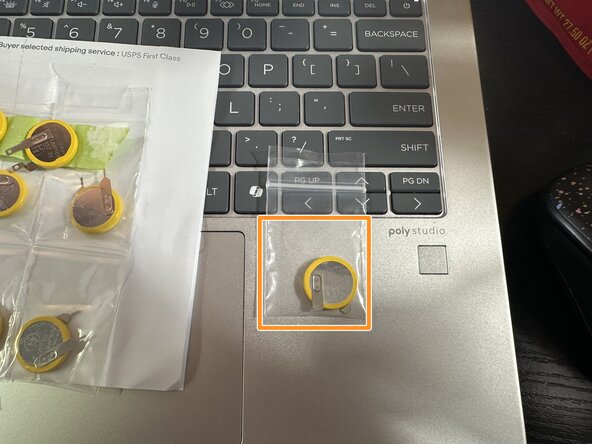


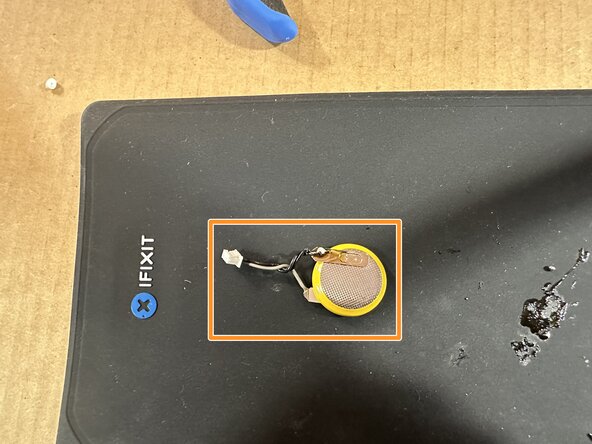


After building the replacement cell, install it in the notebook. Verify the battery works by setting the BIOS, powering it off and then removing the battery/AC adapter. If the CMOS memory is retained, your battery works.
RECYCLING: I do not know how your local laws work when it comes to disposing of lithium cells as laws vary wildly at the state or county level, even per country; as such, I cannot answer for how you should dispose of the old cell. Follow your local state/county laws, or use a drop off box in a big box store which takes dead lithium batteries.

