15% Off Selected iFixit Tools<\/a> \u2014 Limited Time<br\/>\nFree Shipping on Domestic Orders $75+<\/p>","createdAt":"2026-06-15T16:37:24.835Z","updatedAt":"2026-06-16T07:34:16.264Z","publishedAt":"2026-06-16T07:34:16.302Z","locale":"en","documentId":"s1gcjvoe15hdc1os0ndw1ggb"}}">

15% Off Selected iFixit Tools — Limited Time
Free Shipping on Domestic Orders $75+

follow this guide instead<\/a>.)<\/p>\n\n<p>This guide uses a Toyota Corolla to demonstrate the procedure, which is similar for most motor vehicles.<\/p>\n\n<p><strong>Note<\/strong>: Disconnecting your battery may erase certain stored settings, such as radio\/navigation presets and power window memory. Consult your owner's manual for details.<\/p>"},"subscribed":false,"isFavorite":false,"favoriteCount":2,"isCompleted":false,"completedCount":9,"shopifyStore":{"country":"US","currencyCode":"USD","language":"EN","storeCode":"us","shopDomain":"ifixit-us.myshopify.com","storefrontAccessToken":"db3099692534a56ecec7b974a329d302"},"guideData":{"title":"How to Disconnect a Car or Truck Battery","mainImage":"https:\/\/guide-images.cdn.ifixit.com\/igi\/RXdsMSkvYTBcvTNr.140x105","mainImageUrl2x":"https:\/\/guide-images.cdn.ifixit.com\/igi\/RXdsMSkvYTBcvTNr.200x150","mainImageUrlFull":"https:\/\/guide-images.cdn.ifixit.com\/igi\/RXdsMSkvYTBcvTNr.large","published_date":"Aug 29, 2016","modified_date":"Dec 17, 2025","isTeardown":false,"guideCommentCount":0,"stepCommentCount":3,"viewCounts":{"today":6,"week":64,"month":312,"all":31538},"author":{"url":"https:\/\/www.ifixit.com\/User\/668072\/Jeff+Suovanen","name":"Jeff Suovanen","image":"https:\/\/guide-images.cdn.ifixit.com\/igi\/uYn4Ihpxm4PJCBrU.thumbnail","authorCount":4,"historyUrl":"\/Guide\/history\/66802"},"difficulty":3,"difficultyName":"Moderate","timeRequired":"5 - 10 minutes","flags":[],"mainImageWidth":"140","mainImageHeight":"105","totalTimeIso":"PT600S","stepCount":8}}">

How to Disconnect a Car or Truck Battery

What you need

  1. How to Disconnect a Car or Truck Battery, How to Disconnect a Car or Truck Battery: step 1, image 1 of 3 How to Disconnect a Car or Truck Battery, How to Disconnect a Car or Truck Battery: step 1, image 2 of 3 How to Disconnect a Car or Truck Battery, How to Disconnect a Car or Truck Battery: step 1, image 3 of 3
    • Before you begin, switch the ignition off and remove the key.

    • Make sure the transmission is in Park (or first gear if you have a manual gearbox) and that the parking brake is engaged.

    • Put on work gloves and safety goggles if you have them available.

    • In addition to being dirty, the battery contains corrosive agents and may release flammable gases.

    • Gloves can also help protect you from an unpleasant shock if you accidentally mishandle the battery.

    Ask FixBot

    Add Comment

  2. How to Disconnect a Car or Truck Battery, Open the hood (bonnet): step 2, image 1 of 3 How to Disconnect a Car or Truck Battery, Open the hood (bonnet): step 2, image 2 of 3 How to Disconnect a Car or Truck Battery, Open the hood (bonnet): step 2, image 3 of 3
    • Most motor vehicle batteries are located in the engine bay, under the hood (a.k.a. bonnet). If your battery is located elsewhere, skip to Step 5.

    • If you're not sure, simply continue reading.

    • Pull the hood release lever. It's usually located inside the car, near the steering wheel.

    Ask FixBot

    Add Comment

  3. How to Disconnect a Car or Truck Battery: step 3, image 1 of 3 How to Disconnect a Car or Truck Battery: step 3, image 2 of 3 How to Disconnect a Car or Truck Battery: step 3, image 3 of 3
    • Raise the hood by simultaneously lifting and pressing up on the hood latch release (usually located beneath the front edge of the hood, near the center or center-right).

    Ask FixBot

    Add Comment

  4. How to Disconnect a Car or Truck Battery: step 4, image 1 of 3 How to Disconnect a Car or Truck Battery: step 4, image 2 of 3 How to Disconnect a Car or Truck Battery: step 4, image 3 of 3
    • At this point, depending on the vehicle, your hood may raise and support itself automatically.

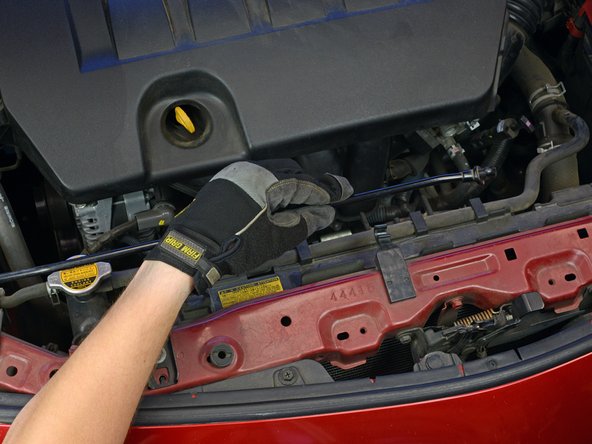
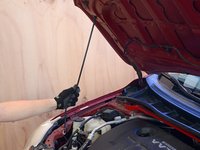
    • If not, use one hand to hold the hood open temporarily while securing the hood with the prop rod:

    • Lift one end of the prop rod up or out to release it from the front area of the engine bay.

    • Swing the end of the prop rod up and slide it into the cutout on the underside of the hood.

    • Make sure the hood is well secured before you let go with your other hand, or it may fall and injure you.

    Ask FixBot

    Add Comment

  5. How to Disconnect a Car or Truck Battery: step 5, image 1 of 3 How to Disconnect a Car or Truck Battery: step 5, image 2 of 3 How to Disconnect a Car or Truck Battery: step 5, image 3 of 3
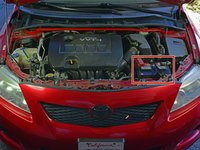
    • Locate the battery. It's normally rectangular and roughly 8-14" across.

    • The battery may be easy to spot, or it may lie under a plastic cover—usually marked with positive (+) and/or negative (-) symbols.

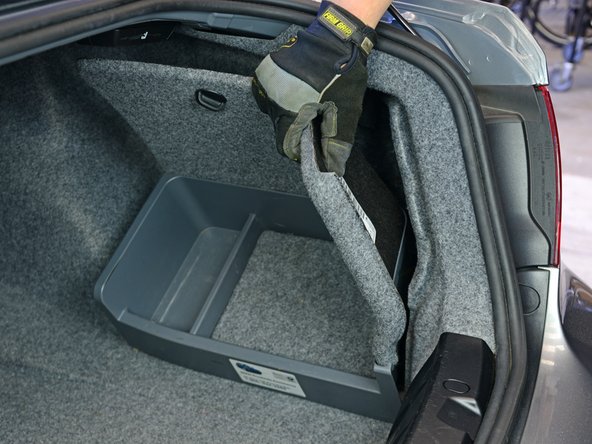
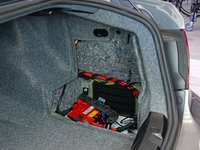
    • On some models, the battery may be located in the trunk—usually under or behind the trunk lining. Look around or consult your owner's manual.

    Ask FixBot

    Add Comment

  6. How to Disconnect a Car or Truck Battery: step 6, image 1 of 3 How to Disconnect a Car or Truck Battery: step 6, image 2 of 3 How to Disconnect a Car or Truck Battery: step 6, image 3 of 3
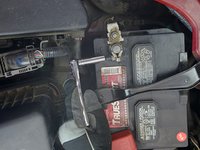
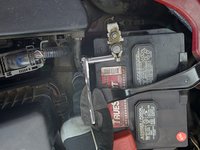
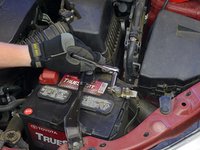
    • Using a correctly sized wrench or socket, loosen the nut/bolt securing the cable on the negative battery terminal.

    • Always disconnect the negative cable first (before removing the positive cable).

    • The negative terminal may be marked with a minus (-) symbol, or it may be unmarked. The positive terminal is almost always marked with a plus (+) symbol, often in red.

    • If the nut or bolt spins without loosening, it may be necessary to counter-hold the opposite side with a second wrench or socket.

    Ask FixBot

    Add Comment

  7. How to Disconnect a Car or Truck Battery: step 7, image 1 of 2 How to Disconnect a Car or Truck Battery: step 7, image 2 of 2
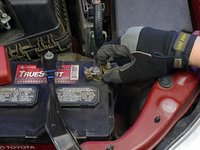
    • Remove the cable from the negative battery terminal.

    • When connecting the battery, it is advised to roughen up the battery terminals and clean the cable clamp beforehand.

    • Upon reconnecting the battery, make sure to seal the pole connections with an appropriate terminal grease or terminal spray.

    Ask FixBot

    Add Comment

  8. How to Disconnect a Car or Truck Battery: step 8, image 1 of 2 How to Disconnect a Car or Truck Battery: step 8, image 2 of 2
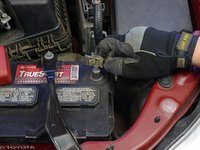
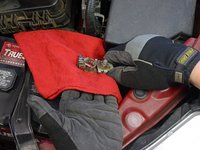
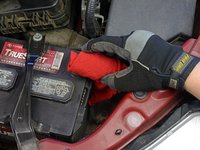
    • Prevent the cable from making accidental contact with the terminal by pushing it aside and/or wrapping the cable clamp with a dry rag.

    Ask FixBot

    Add Comment

Conclusion

To reassemble your device, follow these instructions in reverse order.

Cancel: I did not complete this guide.

9 other people completed this guide.

Jeff Suovanen

Member since: 08/06/13

452,924 Reputation

259 Guides authored

Team

iFixit Member of iFixit

Staff

122 Members

25,946 Guides authored

0 Guide Comments

Add Comment

View Statistics:

Past 24 Hours: 6

Past 7 Days: 64

Past 30 Days: 312

All Time: 31,538